

The best STX wallet for most people is Leather or Xverse, both of which hold STX, sBTC and native bitcoin in one place and support staking directly. Pair either with a Ledger hardware wallet if you hold a meaningful amount. Teams and institutions are better served by Asigna for multisig custody or Fordefi for policy-controlled wallets, the other two options listed in the official Stacks wallet connector.
STX lives on its own chain, so a wallet has to support the Stacks network specifically. A Bitcoin-only wallet or a standard Ethereum wallet will not show your STX, and sending it to one is a common and expensive mistake.
Quick Picks
- Best all-round choice: Leather, for its staking app, Ledger support and sBTC tools
- Best for mobile: Xverse, with matching mobile and browser apps
- Best for long-term storage: Ledger, used through Leather or Xverse
- Best for teams and DAOs: Asigna multisig
- Best for institutions: Fordefi
The Wallets in Detail
Leather
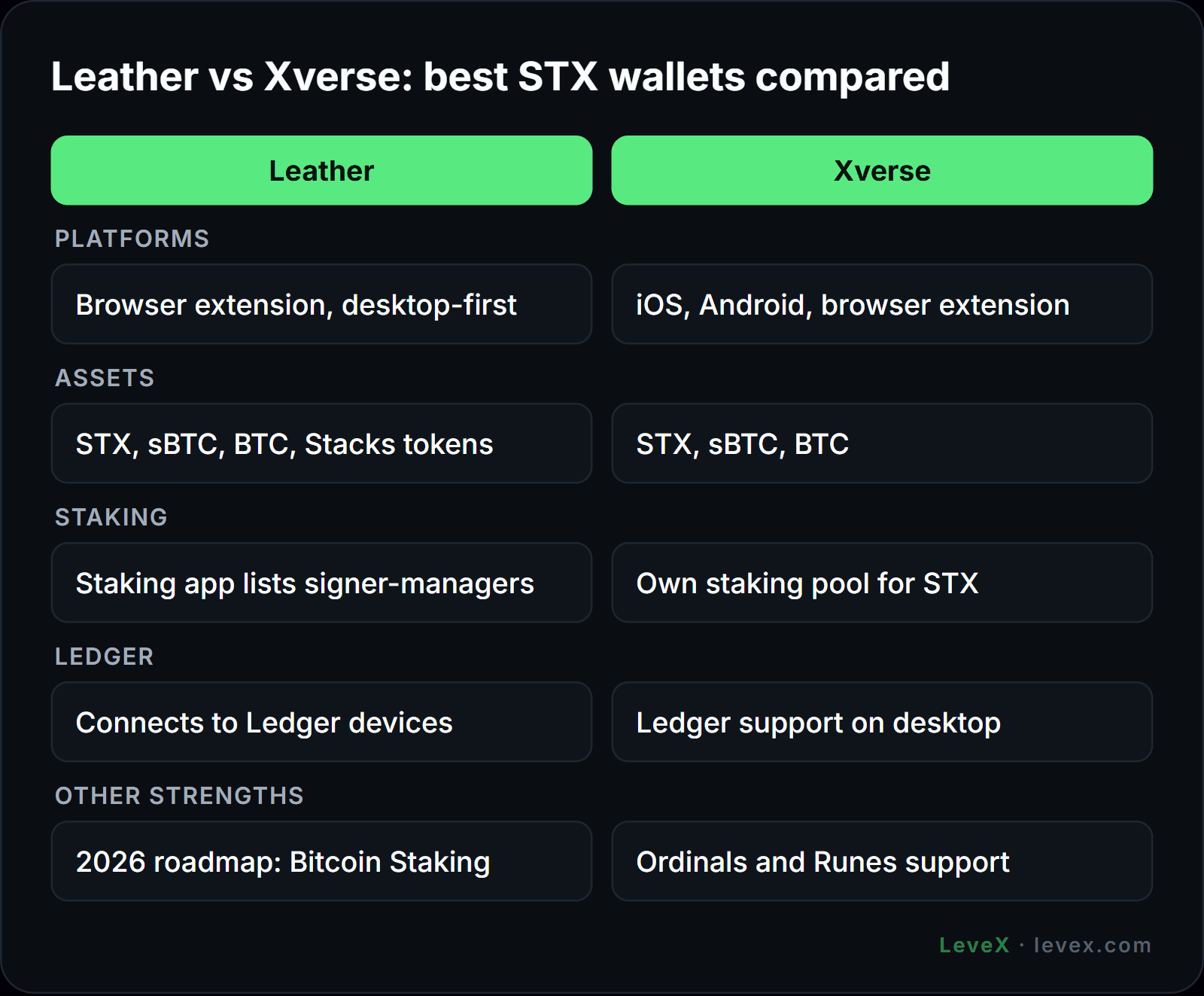
Leather is a browser-extension wallet built around Bitcoin and Stacks. It shows STX, sBTC, BTC and Stacks tokens side by side, and its staking app lists the available signer-managers so you can lock STX without visiting a separate site. That makes it the most direct route for holders who want to follow our guide on how to stake STX.
Leather connects to Ledger devices, and the 2026 Stacks roadmap names it as the wallet getting native support for Bitcoin Staking, multisig and improved Ledger integration. Its main drawback is that the core experience is desktop-first. More information is on the Leather website.
Xverse
Xverse runs on iOS, Android and as a browser extension, which makes it the better pick if you manage crypto mainly from your phone. It holds STX, sBTC and BTC, connects to Stacks apps and offers its own staking pool for STX. Xverse also supports Ledger on desktop, so you can keep keys offline while using the mobile app for viewing balances.
The wallet has strong support for the wider Bitcoin ecosystem, including Ordinals and Runes, which suits holders who use Stacks alongside other Bitcoin assets. Check the Xverse site for current feature support before relying on a specific function.
Ledger
Ledger is a hardware wallet rather than an app, and it is the safest way to hold STX for the long term. Your private keys stay on the device, so a compromised computer cannot sign transactions without physical confirmation. To use it with Stacks, install the Stacks app on the device and manage it through Leather or Xverse. For PoX-5 staking, the Stacks app must be version 0.26.15 or newer.
Staked STX stays on your Ledger-controlled address while it is locked, so you can earn BTC rewards without moving your tokens to a hot wallet. The trade-offs between offline and online storage are covered in our guides to cold wallets and hot wallets.
Asigna and Fordefi for Shared Custody
Asigna is a multisig wallet for Bitcoin and Stacks that requires several keys to approve each transaction. It suits DAOs, funds and teams that should not rely on one person. It works with the sBTC bridge, so a treasury can move bitcoin onto Stacks without one signer controlling the funds. Fordefi is an institutional wallet using multi-party computation, with transaction policies and approvals that compliance teams expect. Both appear in the Stacks wallet support list alongside Leather and Xverse.
What to Look For in an STX Wallet
The first test is Stacks support. A Stacks address begins with "SP" and is different from both your Bitcoin address and any Ethereum address, so confirm the wallet shows an SP address before you send anything.
Next comes staking. Under PoX-5, staking is handled through the wallet you hold STX in, and payouts arrive as sBTC unless your pool sends native BTC. A wallet that cannot display sBTC will hide your rewards. If you plan to use the bitcoin side of Stacks, check that the wallet supports sBTC deposits and withdrawals, as described in our sBTC explainer.
For larger holdings, hardware support matters more than features. A wallet that pairs with Ledger lets you take part in staking and governance while keeping keys offline. Bitcoin Staking bonds also require BTC timelocks on the Bitcoin chain, so holders who want to join through pooled products should pick a wallet with strong Bitcoin support. Our article on Stacks Bitcoin Staking covers how those bonds and pools work.
Moving STX From LeveX to Your Wallet
When you withdraw STX from LeveX, choose the Stacks network and paste your wallet's SP address. Some wallets and apps require a memo for deposits to shared addresses, so read the destination's instructions first. Send a small test amount before a large transfer, especially the first time you use a new wallet.
Keep in mind that a wallet only stores the tokens, while the value of the position still moves with the market. The supply dynamics in our STX tokenomics breakdown and the scenarios in our STX price prediction apply whether your STX sits on an exchange or on a hardware device.
Holders comparing Bitcoin layers should know that wallets do not carry over automatically. Rootstock uses Ethereum-style addresses and EVM wallets, while Stacks needs Stacks-specific ones, a difference explored in our Stacks vs Rootstock comparison.
STX Wallet FAQ
Can I store STX in MetaMask?
No. MetaMask does not support the Stacks network, so it cannot show or send STX. Use a Stacks wallet such as Leather or Xverse.
Does Ledger support STX?
Yes. Ledger supports STX through its Stacks app, which you manage with Leather or Xverse. Version 0.26.15 or newer is required for PoX-5 staking.
Can I stake STX from my wallet?
Yes. Leather and Xverse both let you stake STX through a pool, and your tokens stay in your own wallet while they are locked. Rewards arrive as sBTC or as native BTC if your pool supports it.
Picking the Right Home for Your STX
For most holders, Leather or Xverse with a Ledger attached covers everything: storage, staking, sBTC and access to Stacks apps. Teams should look at Asigna or Fordefi, where no single key controls the funds. Whichever you choose, confirm Stacks support and test with a small amount first.
You can buy STX on the LeveX STX spot market and withdraw it to your chosen wallet, or trade STX perpetual futures without moving tokens at all. For more guides like this one, visit Crypto in a Minute.