
The best wallet for most SKL holders is MetaMask, because it works directly with the SKALE Portal for staking and can connect a Ledger or Trezor hardware wallet for extra security. SKL is an ERC-20 token on Ethereum, so any wallet that supports Ethereum tokens can hold it, but only a few make staking and SKALE chain access easy.
The right choice depends on what you plan to do with your SKALE tokens. Holding for the long term, staking for rewards and using apps on SKALE chains each point to a slightly different setup.
SKL on Ethereum vs SKL on SKALE Chains
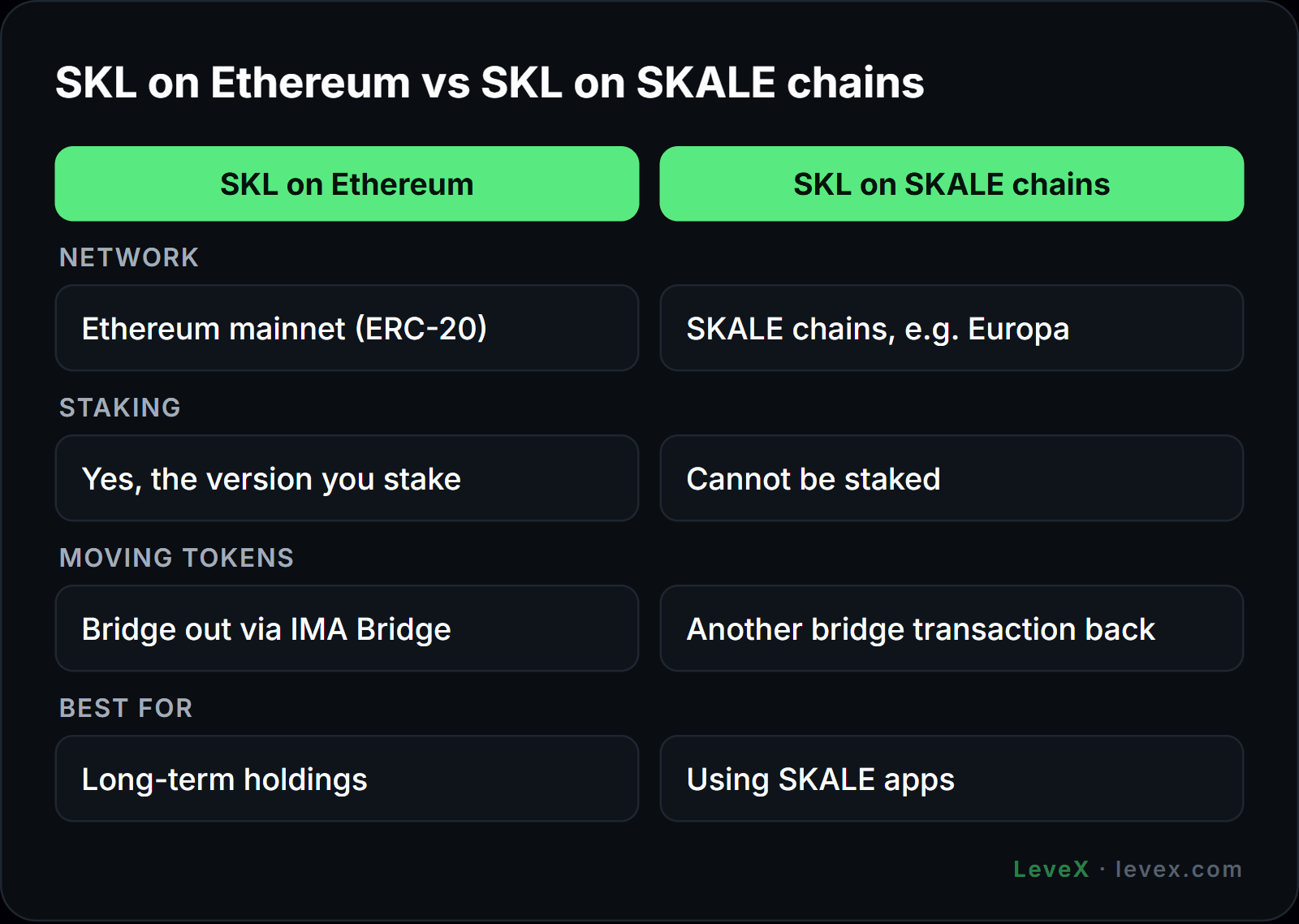
Most SKL lives on Ethereum mainnet as an ERC-20 token. That is the version you stake, the version exchanges deposit and withdraw, and the one you can verify on the SKL token page on Etherscan. Its fixed 7 billion cap and the way new tokens enter circulation are covered in our breakdown of SKL's supply and allocation.
SKL can also be bridged to SKALE chains, such as the Europa liquidity hub, through the IMA Bridge. Bridged SKL is useful inside SKALE apps but cannot be staked, and moving it back requires another bridge transaction. On SKALE chains, wallets pay gas with sFUEL, a free token that apps usually supply automatically, as explained in our guide to SKALE gas fees. Given the security incident SKALE disclosed on the IMA Bridge in late August 2026, keep long-term holdings on Ethereum unless you need them on a SKALE chain.
Best Wallets for SKL Compared
| Wallet | Type | Best for | SKALE Portal staking | SKALE chains |
|---|---|---|---|---|
| MetaMask | Browser and mobile | Staking and everyday use | Yes, the Portal's main wallet | Yes, add each chain as a custom network |
| Ledger | Hardware | Long-term holding | Yes, connected through MetaMask | Yes, through MetaMask |
| Trezor | Hardware | Long-term holding | Yes, connected through MetaMask | Yes, through MetaMask |
| Rabby | Browser and mobile | Multi-chain DeFi users | Works with most dApps, check before staking | Yes, as a custom network |
| Zerion | Mobile and browser | Tracking holdings across chains | Not the Portal's primary wallet | Limited |
MetaMask is the default for a reason. The SKALE Portal is built around it, it handles Ethereum and custom SKALE networks in one place, and the MetaMask extension can act as the interface for a hardware wallet. Anyone who wants to delegate should start there, since our guide on how to stake SKL assumes a MetaMask connection.
Hardware Wallets for Long-Term Holders
Ledger and Trezor keep your private keys offline, so a compromised computer cannot sign transactions without the physical device. Both support ERC-20 tokens, which means SKL appears once you connect the device to MetaMask and add the token. You can still stake: the Portal sees the hardware account through MetaMask, and every delegation is confirmed on the device.
For holders planning to sit through the long and uncertain scenarios in our SKL price prediction, a hardware wallet is the safest default. Our guide to cold wallets covers setup and backup practices that apply to any token.
How to Add SKL to MetaMask
- Open MetaMask and select the Ethereum Mainnet network.
- Go to the Tokens tab and choose Import tokens.
- Paste the SKL contract address: 0x00c83aecc790e8a4453e5dd3b0b4b3680501a7a7.
- Confirm the symbol shows as SKL with 18 decimals, then import.
- To use a SKALE chain, add it as a custom network using the RPC details in the SKALE connection documentation.
Always copy contract addresses from an official source. Fake SKL tokens with similar names exist, and importing the wrong contract is a common way to be tricked into worthless tokens. Adding a SKALE chain works the same way as adding any other EVM network, though each SKALE chain is its own network, a design difference our SKALE vs Polygon comparison explains.
Security Habits That Matter More Than the Wallet
- Write your seed phrase on paper or metal and never store it in a photo, email or cloud document.
- Treat "SKL airdrop" sites with suspicion. The planned FAIR airdrop for SKL holders still depends on mainnet and governance approval, so any page asking you to claim it now should be treated as a scam.
- Revoke old token approvals periodically, especially after interacting with new apps.
- Use a separate hot wallet for experiments with SKALE apps and keep your main holdings elsewhere.
AI agents on SKALE typically run their own programmatic wallets funded with USDC, which is a separate setup from a personal SKL wallet, as our article on SKALE AI agents describes. For the basics of how keys and addresses work, see understanding cryptocurrency wallets and keys.
SKL Wallet FAQ
What wallet supports SKALE?
Any Ethereum wallet that supports ERC-20 tokens can hold SKL, including MetaMask, Rabby, Ledger and Trezor. MetaMask is the most practical choice because the SKALE Portal uses it for staking and it can add SKALE chains as custom networks.
Can I store SKL on a Ledger?
Yes. Ledger supports SKL as an ERC-20 token, and you can manage and stake it by connecting the Ledger to MetaMask.
What network is SKL on?
SKL is issued on Ethereum mainnet as an ERC-20 token. It can be bridged to SKALE chains, but staking only works with the Ethereum version.
Choosing Your SKL Setup
For most holders, MetaMask paired with a hardware wallet covers everything: safe storage, staking through the Portal and access to SKALE chains when needed. Keep long-term SKL on Ethereum and bridge only what you plan to use.
If you would rather trade than self-custody, SKL is available on the LeveX SKL/USDT spot market and as SKL perpetual futures for leveraged long or short positions. Find more token guides in Crypto in a Minute.